Anvils
- Stone Anvils
- Obtaining Raw Rock
- Welding
- Metal Anvils
- Tiers
- Working Metal
- Forging Bonuses
- Helve Hammer
- Anvil Helper Guide
Introduction
An alternative to casting tools directly (and a requirement for higher tier metals) is to use an Anvil. An anvil is a block which can be used for two different processes: Working and Welding. An anvil can weld double ingots of the metal type needed to create the next tier anvil above it, which will be necessary to work other items from that metal.
Stone Anvil
First, you need to acquire a block of raw igneous rock, that is igneous extrusive (Rhyolite, Basalt, Andesite, or Dacite) or igneous intrusive (Granite, Diorite, Gabbro, Pyroxenite, or Keratophyre). You could find and use an exposed block in the world, or you could extract one from the surrounding rock.
You will also need any kind of hammer. In order to make the anvil, simply 右键 the exposed top face of a raw rock block with your hammer, and voilà! An anvil will be formed.
Anvils have tiers and the rock anvil is tier 0 - the lowest tier. It is only able to Weld tier I ingots.
将中间那块岩石作为石砧。
获得天然岩石
In order to obtain a raw rock block without breaking it into smaller rocks, it needs to be extracted. You must mine the blocks on all six sides of a raw rock block. Once it is surrounded by air on all sides it will pop off as an item which can be picked up.
挖掉一块天然岩石的所有六个邻面——完成后,中心块将作为物品掉落。
Welding
Welding is a process through which two items are fused together to create a new item. Welding works the same whether on a Stone Anvil or a Metal Anvil.
First, you must place the two items you want to weld on the anvil by opening the anvil interface and inserting them in the two leftmost slots.
You also need to have at least one Flux in the anvil to aid the welding process. Then, while both items are hot enough to weld (the tooltip will say "Can Weld") you must use any hammer on the anvil or press the weld button on the anvil interface. You will hear a hammering sound and the items will be welded together.
Metal Anvils
Metal anvils are an important tool required for metalworking, as they allow you to work and weld metal ingots into various different forms.
Working is done to form one piece of metal into another, and welding, is used to fuse two metal items into one solid piece.
各式各样的金属砧。
Anvils can be crafted with Double Ingots of their respective metal. For your first anvil, you must first Weld double ingots on a Stone Anvil. Anvils are very heavy, you can only carry one at a time.
砧是分等级的。等级决定了什么样的金属和材料可以在这个砧上加工。只有等级和砧相同或比砧低的材料才可以在砧上锻造,而能在砧上焊接的金属的最大等级为砧的等级 +1。
- 第零级:石砧
- 第一级:铜
- 第二级:铋铜、黑铜、青铜
- 第三级:锻铁
- 第四级:钢
- 第五级:黑钢
- 第六级:红钢、蓝钢
Working
In order to work an item on the anvil, you will need to 右键 the anvil, to open up the anvil interface, seen on the next image. On the left, there are two input slots for items - for working, the target item must be in the right-hand slot. You will also need a hammer while working, either in the hammer slot on the right of the anvil or in your main hand. The hammer will gradually take damage as you work the item.
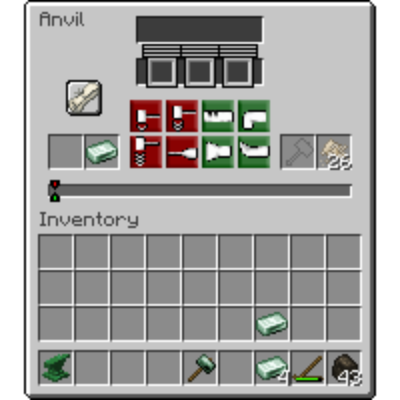
砧界面。
You will then need to select the plan, which chooses which item you want to create. 左键 on the scroll button, and then pick one of the items to create. The anvil interface will return, but now you will have selected a plan. The scroll will show the item you are working to create, and the rules and target will now be populated.
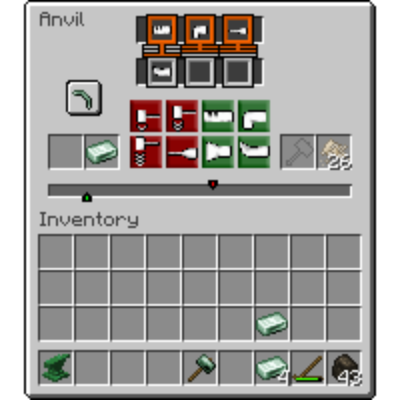
示例:选择镐头作为目标。
完成锻造目标
屏幕的最中间有一根长条和一红一绿两个指针。绿色指针表示了目前的锻造进度。红色指针表示了锻造目标。
你需要做的,就是将绿色指针与红色指针对齐。
Green actions will always move your target right, and Red actions will always move your progress left. Note that if you move your target off of the progress bar, you will have overworked your item and will lose the ingot. However, while working, you must also match the rules...
锻造规则
每个目标都会有两到三个锻造规则,标注在屏幕顶部。锻造规则要求你按照特定的顺序使用特定的锻造手法来完成目标。比如,如果一个锻造规则要求“弯曲 倒数第二”,则你将指针对齐前的倒数第二个手法必须是“弯曲”。
Your last three actions are shown right underneath the rules. When a rule is satisfied, its outline will change to green. Success occurs when all rules are satisfied.
Finally, you have to be mindful of your item's temperature. Metals can only be worked when they are above a certain temperature where the tooltip shows "Can Work". You may take an item out and re-heat it during the working process.
Confused? That's ok, it's a lot to take in, but it's actually just a simple bit of addition and subtraction. Check our step-by-step guide on how to use the "anvil helper" resource pack, which makes smithing easy!
锻造评价
Working can be tedious, and take many steps to get correct. However, there is a reward for being efficient. Some items―such as tool heads―when they are worked in a low or minimal amount of steps, receive a Forging Bonus based on how efficiently they were forged. This bonus will then apply to tools that the item is used in, for example, a pickaxe head used to make a pickaxe.
We also have a step-by-step guide on how to perfectly forge anything!
完美
There are four tiers of forging bonus:
- Modestly Forged
- Well Forged
- Expertly Forged
- Perfectly Forged
These bonuses increase the power of your tool - making it break less often, mine faster, and/or do more damage in combat, depending on the tool.
Helve Hammer
The Helve Hammer is a device that can automate many anvil functions using mechanical energy.
To function, a helve hammer needs an anvil below its striking face. The Tier of the anvil will dictate how many blows is needed. To add items to a helve hammer simply throw them on top of the anvil with Q. Items may be extracted automatically by adding funnels to the hammer head block.
Helve hammer with anvil.
It is recommened to make two helve hammers and chain them together to automatically process Blooms and Steel.
Anvil Helper Guide
Working in Anvils is a key process inside TerraFirmaGreg, as most of your work towards the Steam and Mechanical ages will require the usage of an Anvil.
This guide is broken down into two parts, Understanding the UI and How to Perfectly Forge.
The Modpack has a custom Resource Pack called TFC Anvil Helper that you need to enable for this guide to make sense.
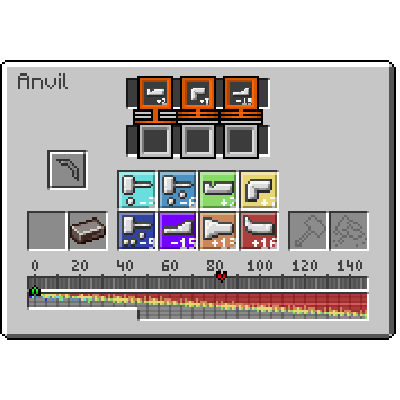
启用TFC Anvil Helper后的砧具界面
The UI and You
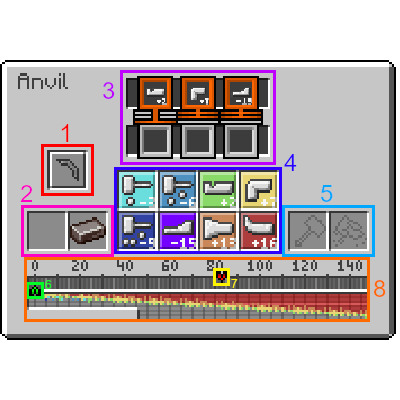
启用TFC Anvil Helper后的砧具界面(颜色标识版)。
1. 你在砧上选择制作的物品。每个物品都有特定的步骤序列和目标加工量要求。
2. 你正在加工的输入物品。
3. 物品完成前必须按顺序执行的步骤序列。共有4种序列类型(详见下页):
(注意:X 是任意步骤的通配符)
- x_任意: 步骤可以在最后3个动作中的任意一个发生。
- x_末尾: 必须是最后一个执行的步骤。
- x_非最末: 步骤不能是最后一个执行的步骤。
- x_倒数第二: 必须是倒数第二个步骤。
- x_倒数第三: 必须是倒数第三个步骤
4.步骤类型。每种类型都会增加或减少当前加工值。从左至右、从上到下依次为:
- 轻击:-3
- 中击:-6
- 冲压:+2
- 弯曲:+7
- 重击:-9
- 牵拉:-15
- 镦锻:+13
- 收缩:+16
5. The Slots where your Hammer goes, and Flux if you're Welding.
6. The current Work amount the item has, Doing different Steps either Increases or Decreases the amount of Work the item has.
7. The Target Work value, the Work value must be aligned EXACTLY with the Target Work, AND the Required Steps must be fulfilled for the Item to be considered complete.
8. The Work Bar, used for Aligning the Work value with the Target Work value.
如何完美锻造
Perfectly Forging an Item which can break, such as Tool Heads, Weapons, and Armor causes the Item to gain bonuses to its durability and general efficiency with the less total steps you take to forge the Item. Completing the Work on an Item with very few steps causes it to be Perfectly Forged, not only giving your finished item bonuses, but also reducing the overall wear and tear to the Hammer.
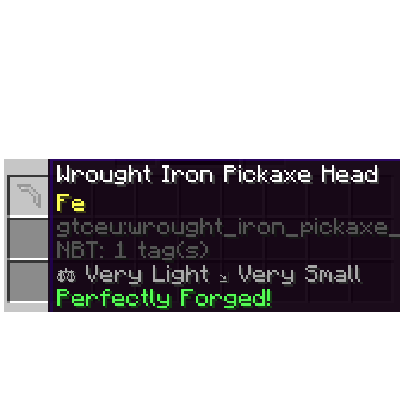
一个完美锻造的锻铁镐头
锻造指南
This part of the guide will cover how to Perfectly Forge anything, starting with a Wrought Iron Pickaxe Head.
DISCLAIMER:
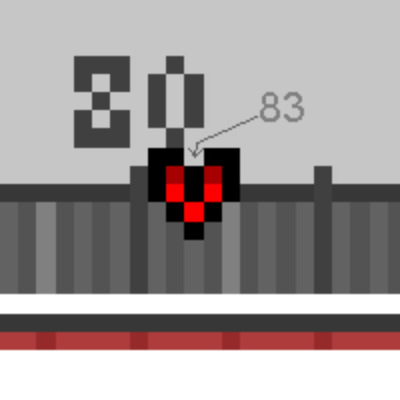
While the Required Steps and Orders for an Item are universal within all worlds in TFG, the Target Work value differs because it's derived from your world's Seed, as such, this Guide ASSUMES the Target Work value for the Wrought Iron Pickaxe Head is 83.
第一步
The first Step in your Forging Journey is to get the Value taken by Adding all the Required Step's values together. For a Pickaxe Head, you need the following Steps:
- Punch Last
- Bend Not Last
- Draw Not Last.
By adding the Values on the Bottom of each Step, We get the Value we're looking for. Let's call this value "requiredWork".
2 + 7 + (-15) = -6
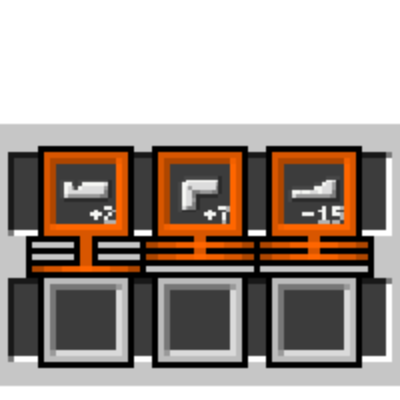
制作镐头所需的步骤
第二步
While our main goal for the Work Amount is to align it with the Target Work, we need to make sure both that requirement AND the Steps requirements are fulfilled, as such, directly aligning the Work Amount with the Target Work will not yield desirable results. Instead, we can calculate the value derived from Target Work and "requiredWork"
此值的计算方法取决于"必需加工量"的正负:
- 若"必需加工量"为正值
- 从"目标加工值"中减去"必需加工量"的绝对值
- 83 - 6 == 77
- 若"必需加工量"为负值
- 将"必需加工量"的绝对值加到"目标加工值"上
- 83 + 6 = 89
本例中"必需加工值"为 -6,故中间值为 89。
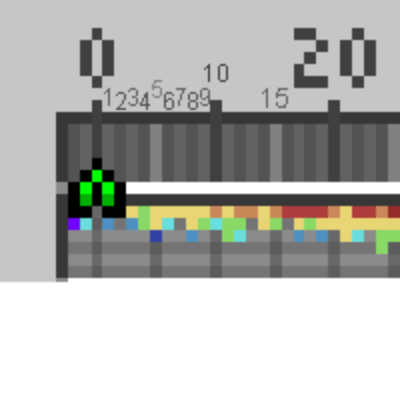
你可能会问,如何获知精确的目标加工值?砧具界面的进度条会显示。刻度线虽只显示20的倍数,但可通过颜色判断:
- 浅灰色:代表5的倍数
- 灰色:代表奇数
- 深灰色:代表偶数
第三步
有了从"目标加工值"和"必需加工值"推导出的中间值后,我们需要通过锻造使加工量达到这个值。你可以通过手动累加各步骤的数值来完成,或直接参考界面进度条上的"速查表"(每种颜色对应一种步骤类型)。
例如:红色 = 收缩 (+16)
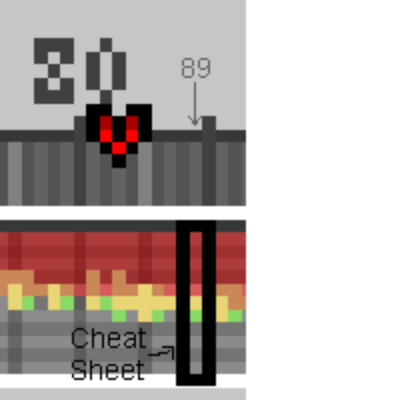
16 + 16 + 16 + 16 + 16 + 7 + 2 = 89
第四步
Now that we know the required steps, it's time to reach the Value derived from "Target Work" and "requiredWork". For a pickaxe head where it's TotalWork value is 83, we need to reach 89. As such, we do: (Shrink x 5) → Bend → Punch.
Once our Work value is at our desired value, just follow the Required Steps, which for a pickaxe head its: Draw → Bend → Punch. And Voilà! We've obtained a Perfectly Forged Item!
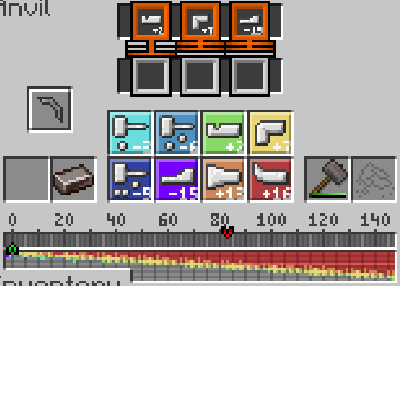
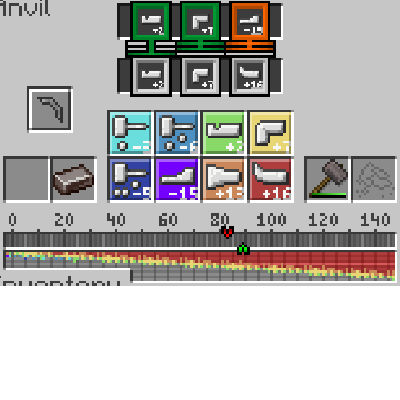
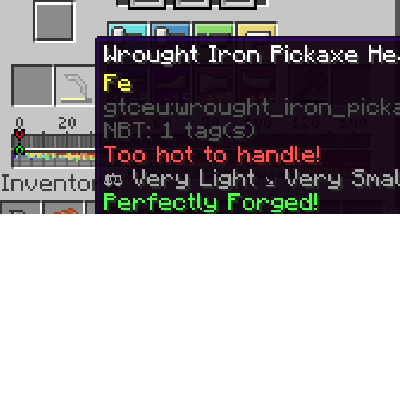
An Ingot with No Work → Desired Work Value Reached → Doing the Required Steps for our Item.
其他示例
Lets see this process with other items, such as a Plate, or a Rod. Again, the Target Work differs by the world seed, so their values will be different on your world.
Plate Target Value: 111
Required Steps: Hit x 3, Any Order.
"requiredWork": -3 x 3 = -9
Derived Value: 111 + 9 = 120.
Reaching the Value: (Shrink x 5) → (Upset x 2) → (Punch x 2)
Getting the Item: 120 - (Light Hit x 3) == 111. Both requirements met.
Rod Target Value: 78
Required Steps: Draw → Draw → Bend
"requiredWork": (-15 x 2) + 7 = -23
Derived Value: 78 + 23 = 101.
Reaching the Value: (Shrink x 5) → (Bend x 3)
Getting the Item: 101 - 15 - 15 + 7 = 78.
其他提示
如果某个必需步骤显示为空,则表示这是一个通配符,可以使用任何步骤。
如果计算失误,你可以随时将物品熔化成锭,这将移除物品的"已加工"标签,让你可以重新尝试完美锻造。
Congratulations on reaching the end! If you want to follow along in a creative world, the seed used during its writing is -7291708953208913102.
评论