Crucible
A Crucible is an advanced device used for the creation of Alloys. It is a more precise method than using a Small Vessel to make alloys.
To obtain a crucible, you will first need to obtain some Fire Clay, which is a stronger material than clay. This fire clay can then be knapped to shape it into an Unfired Crucible.
Лепка необожженного тигля.
After the crucible is knapped, it will need to be Fired, like any piece of pottery.
In order to use the crucible, it needs a source of heat. The crucible can be heated by any heatable block below, preferably a Charcoal Forge.
Importantly, crucibles transfer their heat to items much faster than forges. This can be good or bad. If low-melting-point items like Tin are being troublesome for working, consider sticking to the forge for heating.
Тигель, нагреваемый угольной кузницей снизу.
Advanced Alloying
Now you are ready to use the crucible. When you interact with it, you will see the Crucible Interface, shown on the next page. The top region shows the current metal content of the crucible. The first metal shown is what would be produced, if it were to be extracted right now. Other metals shown are the makeup of the current alloy in the crucible.
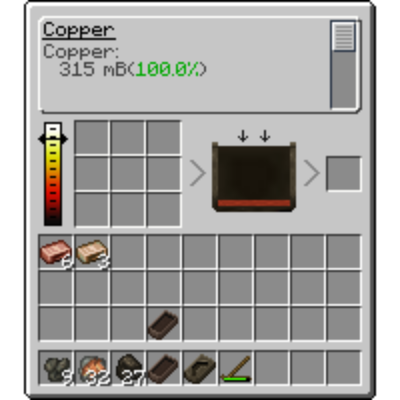
Интерфейс тигля
The crucible has nine slots where items can be added to be melted, and their liquefied contents will be directly added to the crucible. Molten metal containers such as Molds can also be placed here, and they will be drained into the crucible, allowing for precise control over your alloy's content. Holding Shift while hovering over a draining mold or vessel makes it drain faster.
Molds or other fluid containers can also be placed in the output slot, and will be slowly filled with the contents of the crucible.
The temperature indicator on the left will rise based on external sources of heat, such as a Charcoal Forge below or heat from a Blast Furnace above. Metal can be extracted from the crucible as long as it is still molten.
The crucible will also keep its contents when broken, allowing you to transport the alloy container around if you wish.
You will have successfully alloyed when the text at the top of the crucible says the name of your alloy.
If you accidentally mix the wrong type of metal into your molten alloy, then unfortunately you have lost the whole batch. Even a small amount of foreign metal can ruin an alloy. You may also find yourself running out of room in your crucible before hitting your perfect ratio, and you may worry you have wasted the metal. Luckily, you can sacrifice some product by decanting a bit of metal to make room for more material. An alloy is only permanent when cast!
Molten Alloy
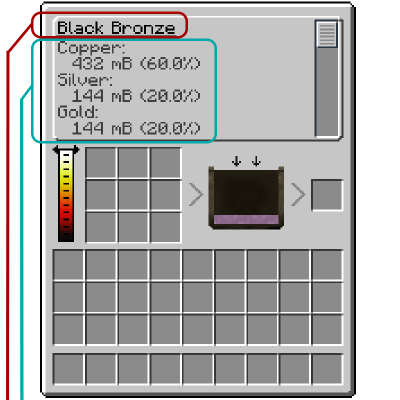
◼ - Alloyed result.
◼ - List of contributing metal fractions.
Channel Casting
Channel Casting
Channel Casting
Channel Casting
You can cast from a Crucible to more than one mold at a time using Channels and Mold Tables. Simply connect the Mold Tables to the Crucible using Channels and ПКМ on the Channel next to the Crucible. Shift-ПКМ the Mold Table with a Mold to place it or remove it.
A casting set up
Channels will evenly distribute molten metal to all connected tables. Tables will not have a chance to break the mold inside.
Automation
- Using a Bellows on a Mold Table will cool the metal faster.
- Activating a Channel with a redstone pulse will also start pouring the metal.
- Mold Tables output a comparator signal.
- Metal can be directly pumped in from things like fluid pipes or a draining Blast Furnace.
- Hoppers can extract cooled metal items from molds while leaving the mold behind.
Comments