Temperatura gracza
Player Temperature is the temperature that affects, you, the player, and nothing else. It's different from, but influenced by, the Current and Average Temperature of your climate, among other things.
You need to keep an eye on it to avoid heatstroke or freezing!
Zawartość
- How to see your temperature
- What affects it?
- Climate and Seasons
- Wetness
- Direct sunlight
- Sprinting
- Blocks
- Food Effects
- Clothing
- Enclosed Spaces
- Heat Pump
The Hotbar HUD
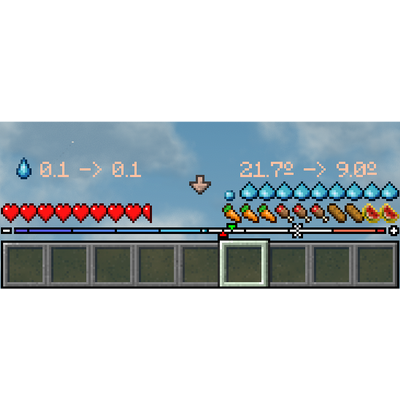
Strzałka w środku wskazuje, czy twoja temperatura wzrasta czy spada.
You can see your player temperature by holding Shift and looking at the numbers above your hotbar at the bottom of the screen.
The two numbers on the right indicate your current player temperature and the target temperature, or the number your temperature is "trending towards" if your situation doesn't change.
The two numbers on the left are the same for your wetness.
The right two temperature numbers are the ones to pay attention to! If your player temperature goes above 30°C or below 0°C, you will begin taking damage.
When you are close to these temperatures, the arrow in the middle of the HUD will either be a bright orange or dark blue, and you will have an orange or blue tint to your screen.
The gradient bar on the very bottom, replacing your XP bar, shows your player temperature (the white mark), the current climate temperature (the green 🔽), and the average climate temperature (the red 🔼), all at once.
The bar is split into 10°C segments, with the very middle representing 0°C.
Co ma na to wpływ?
There are many things that influence your temperature!
The most obvious one is what your climate is doing. You will be hotter in the summer and colder in the winter, living in the Arctic will make you colder than living in the Tropics, and so on.
Wetness will make you slightly colder, while also making you change temperature a bit faster. Unsurprisingly, you get wet from the rain or swimming, and dry off by... not touching water. Jumping in the water is a great way to cool down!
Standing in direct sunlight increases temperature by a small amount that scales off the current climate temperature. Actively sprinting will also increase it a little.
Various nearby blocks can affect your temperature much more strongly. For example, you can warm up with a Firepit, Charcoal Forge, or blocks like Magma or Lava, while blocks such as Packed Ice will cool you down.
More precisely, blocks will influence your temperature if they are up to 9 blocks away horizontally, up to 3 blocks below you, and up to 5 blocks above you (19x9x19). Of those blocks, only the 5 blocks with the strongest effects will influence your temperature, but any heating devices will always count.
Jedzenie i picie
Some food and drinks may have effects that influence the player's temperature. These are:
- Cooling
- Warming
- Freezing
- Blazing
Drinking Spring Water will warm you up, and Ice Slush will cool you down.
Ubrania
Wearing clothes is another important way to change your temperature. Clothes can either warm you up or cool you down (or neither), and may also have an insulation effect that reduces the amount that other temperatures can influence you.
Some head clothes will also protect against direct sunlight.
Zamknięte przestrzenie
Creating an enclosed space such as a house will provide an insulating effect. Blocks such as doors, trapdoors, and window panes count as "sealed". If you are unsure, the House Tester will tell you!
This effect will only heat a house up to a maximum of 5°C, and does not work in larger structures.
Pompa ciepła
Once you're able to harness electricity, you can craft the Heat Pump, a multiblock that will warm up or cool down much larger sized buildings.
Comments